WPS general usage
In the following we show an example with a [Word Counter]{.title-ref} function which is enabled as a web-service using WPS.
Find a detailed description of WPS usage at the Birdhouse Workshop
Defining a `Word Counter` function
In the following example we will use the [Word Counter]{.title-ref} function:
def count_words(file):
    """Calculates number of words in text document.
    Returns JSON document with occurrences of each word.
    """
    return json_doc
This Python function has the following parts:
- a `name or` `identifier`: count_words
- a `description`: Calculates number of words ...
- `input parameters`: file (mime type [text/plain]{.title-ref})
- `output parameters`: json_doc (mime type [application/json]{.title-ref})
Now, we would like to run this function remotely using a simple web-service. To get this web-service we can use WPS. The function parts (name, parameters) are all we need to know to define a WPS process.
WPS definition of `Word Counter`
To add a new proccess you need to define the input and output parameters. For the [Word Counter]{.title-ref} process this looks like the following.
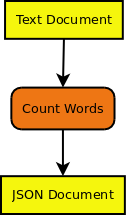
Here is another example for a [Text Generator]{.title-ref} process. We will use it later for chaining processes.
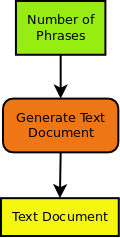
There are two types of input/output parameters:
- Literal Parameters (green): these are simple data types like integer, boolean, string, ...
- Complex Parameters (yellow): these are documents with a mime-type (xml, cvs, jpg, netcdf, ...) provided as URL or directly.
An input/output parameter has:
- a name or [identifier]{.title-ref}
- a descriptive [title]{.title-ref}
- an [abstract]{.title-ref} giving a description of the parameter
- [multiplicity]{.title-ref} ... how often can this parameter occur: optional, once, many ...
- in case of literal parameters a list of [allowed values]{.title-ref}.
Chaining WPS processes {#chaining_WPS}
If you know the input/output parameters of processes you can chain processes. For example we will chain a [Text Generator]{.title-ref} process to our [Word Counter]{.title-ref} process.
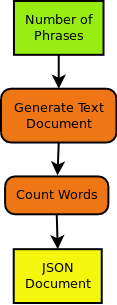
The [Text document]{.title-ref} output of the [Text Generator]{.title-ref} process becomes the input of [Word Counter]{.title-ref} process.
You can chain process manually by calling them one after the other. The WPS specification allows you to also chain process with a single WPS request. To get even more flexibility (using if-clauses, loops, monitoring ...) you can also use a workflow engine <workflow>{.interpreted-text role="term"} (Taverna{.interpreted-text role="term"}, VisTrails{.interpreted-text role="term"}, Dispel4py{.interpreted-text role="term"}, ...).
You will find more details about chaining in the GeoProcessing document and the GeoServer Tutorial.
WPS process implementation with PyWPS
There are several WPS implementations available (GeoServer{.interpreted-text role="term"}, COWS{.interpreted-text role="term"}, ...). In birdhouse, we use the Python implementation PyWPS{.interpreted-text role="term"}. In [PyWPS]{.title-ref} the [Word Counter]{.title-ref} process could look like the following:
::: {.literalinclude language="python" emphasize-lines="8,16,24,32" linenos=""} _tutorial/wps_word_counter.py :::
You can see the definition of the input and output parameters and the execute() method where the real count_words() function is called. You will find more details about implementing a WPS process in the PyWPS Tutorial.
Using WPS
A WPS service has three operations:
- `GetCapabilities`: which processes are available
- `DescribeProcess`: what are the input and output parameters of a specific process
- `Execute`: run a process with parameters.
The following diagram shows these operations:

To call these process one can use simple HTTP request with key/value pairs:
-
[GetCapabilites]{.title-ref} request:
http://localhost:8094/wps?&request=GetCapabilities&service=WPS&version=1.0.0 -
[DescribeProcess]{.title-ref} request for [wordcount]{.title-ref} process:
http://localhost:8094/wps?&request=DescribeProcess&service=WPS&version=1.0.0&identifier=wordcount -
[Exceute]{.title-ref} request:
http://localhost:8094/wps?request=Execute&service=WPS&version=1.0.0&identifier=wordcount
                        &DataInputs=text=http://birdhouse.readthedocs.org/en/latest/index.html
A process can be run [synchronously]{.title-ref} or `asynchronously`:
- sync: You make a HTTP request and you need to wait until the request returns with a response (or timeout). This is only useful for short-running processes.
- async: You make a HTTP request and you get immediately a response document. This document gives you a link to a status document which you need to poll until the process has finished.
Processes can be run with simple HTTP get-requests (as shown above) and also with HTTP post-requests. In the later case XML documents are exchanged with the communication details (process, parameters, ...).
There are also some IPython notebooks which show the usage of WPS.
Calling [Word Counter]{.title-ref} with Birdy
Now, we are using Birdy wps command line client to access the [wordcount]{.title-ref} process.
Which proccess are available ([GetCapabilities]{.title-ref}):
$ birdy -h
usage: birdy [-h] <command> [<args>]

optional arguments:
  -h, --help            show this help message and exit

command:
  List of available commands (wps processes)

  {chomsky,helloworld,inout,ultimatequestionprocess,wordcount}
                      Run "birdy <command> -h" to get additional help.
What input and output parameters does [wordcount]{.title-ref} have ([DescribeProcess]{.title-ref}):
$ birdy wordcount -h
usage: birdy wordcount [-h] --text [TEXT] [--output [{output} [{output} ...]]]

optional arguments:
  -h, --help            show this help message and exit
  --text [TEXT]         Text document: URL of text document, mime
                      types=text/plain
  --output [{output} [{output} ...]]
                      Output: output=Word count result, mime
                      types=text/plain (default: all outputs)
Run [wordcount]{.title-ref} with a text document ([Execute]{.title-ref}):
$ birdy wordcount --text http://birdhouse.readthedocs.org/en/latest/index.html
Execution status: ProcessAccepted
Execution status: ProcessSucceeded
Output:
output=http://localhost:8090/wpsoutputs/emu/output-37445d08-cf0f-11e4-ab7e-68f72837e1b4.txt
WPS Documentation {#appendix_wps_docs}
- What is WPS?
- WPS on OSGeo Live
- WPS tutorial
- OGC Web Processing Service Standard
- PyWPS Wiki
- GeoServer tutorial
Talks:
- The WPS 2.0 standard (preliminary information)
- WPS Application Patterns
- Using WPS (PyWPS) with Taverna Orchestration
- Pywps a tutorial for beginners and developers
- Zoo presentation foss4g.jp-2011
WPS Software
WPS Server Software:
PyWPS{.interpreted-text role="term"}- GeoServer - http://docs.geoserver.org/stable/en/user/services/wps/index.html
- Zoo -
http://www.zoo-project.org/ COWS{.interpreted-text role="term"}- Deegree - http://www.deegree.org/
- 52 North - http://52north.org/communities/geoprocessing/wps/
WPS Client Software:
OWSLib Python Client <OWSLib>{.interpreted-text role="term"}- OpenLayers WPS Plugin - http://dev.openlayers.org/docs/files/OpenLayers/WPSClient-js.html
- GeoTools WPS Module - http://docs.geotools.org/latest/userguide/unsupported/wps.html
- 52 North Java Client - http://52north.org/communities/geoprocessing/wps/index.html
- 52 North Javascript Client - http://geoprocessing.demo.52north.org:8080
- WPS Javascript Client by Boundless - https://github.com/boundlessgeo/wps-gui
QGIS Desktop GIS with wps plugins:
uDig Desktop GIS with wps plugins: